![TransactAPI logo (1).png]](https://support.northcapital.com/hs-fs/hubfs/TransactAPI%20logo%20(1).png?height=30&name=TransactAPI%20logo%20(1).png)
Note: Before updating an investor's KYC/AML status to approved you should manually verify the investor.
To manually update a KYC/AML status:
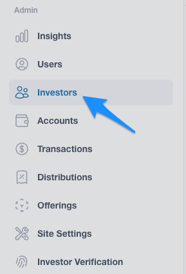
- Navigate to the 'Investors' tab
- Click the name of the investor you would like to update
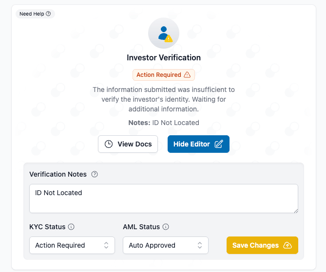
- On the slide over page, under Investor Verification, update KYC Status and/or AML Status to desired status through the relevant dropdown
- Click 'Save Changes'
Not what you're looking for? Check out these related articles:
How are failed KYC/AML scenarios handled?
How do I upload documents for an investor?
How do investors upload KYC/AML or Accreditation documents? (coming soon)